iSyncr: iTunes to Android
- 4.1
- Rating
- 5.00M
- Installs
- Free
- Price

 Analysis by App-foxy
I approached iSyncr: iTunes to Android as someone trying to make an existing music collection feel at home on an Android phone, rather than as someone looking for another streaming service. That distinction matters. This is a free Music & Audio app from JRT Studio Music Players, and its purpose is focused: it helps move an iTunes library into an Android listening routine. In my experience, that narrow purpose is also its biggest strength, because the app is easier to judge when you already have music arranged in iTunes and do not want to rebuild everything from scratch.
The central question is simple: can I keep using the music organization I already understand while changing phones? For people who answer yes, iSyncr can remove a surprisingly annoying layer of work. For people who mainly stream music, have no iTunes library, or want a complete modern music platform with discovery and social features, it is much less compelling. I found that its value depends less on how many songs someone owns and more on how much that existing organization matters to them.
How the app feels when I need to find my music
The first thing I noticed is that the app’s usefulness begins before playback. A transferred collection is only truly helpful if I can still recognize the way I arranged it. Playlists, albums, artists, and familiar naming patterns are more valuable than a flashy interface when I am trying to get to a specific record quickly. That makes iSyncr a practical bridge for people who have spent years sorting music in iTunes.
You May Also Like

 Blood Strike: 2.5 Anniversary
Blood Strike’s Loadouts Turn Every Drop Into a Tactical Gamble
A close look at Blood Strike’s custom loadouts: how fast access to signature weapons reshapes its battle royale rhythm, rewards preparation, and narrows the gap between fights.

 Pandora - Music & Podcasts
Pandora’s Music Is Easy to Start, but Harder to Recover
Pandora’s strength is its low-effort path from a seed to a station. Its weak spot is how much confidence it asks you to place in connection, setup, and quiet recovery.

 8 Ball Pool
 Is Built on Rivalries, Rematches, and Routine
A close look at the rivalries, rematches, shared routines, and unanswered safety questions that turn a quick pool match into a persistent mobile community.

 Samsung Music
’s Quiet Strength Is Playing What You Already Own
Its reach comes less from spectacle than from dependable access to a personal library. That simplicity is both the app’s strongest retention engine and its ceiling.

 AccuWeather: Weather Radar
AccuWeather Review: A Quick, Clear Forecast for Everyday Decisions
For everyday plans, the best forecast is the one you can understand quickly. AccuWeather makes rain timing, radar, and local conditions easy to act on, with a few trade-offs.

 Hill Climb Racing
Why Hill Climb Racing Still Turns Crashes Into One More Run
A tiny car, a bumpy hill and one more upgrade: Hill Climb Racing keeps resurfacing because its simple chaos makes every near-miss feel personal.
More From Our News Desk



Navigation is easiest when the library is already tidy. If my iTunes collection has sensible playlist names and consistent artist information, the Android side has a much better chance of feeling predictable. If the source library is cluttered with duplicates, incomplete tags, or old playlists I no longer use, the transfer can bring that clutter along conceptually, even if the app itself is doing exactly what I asked. My best advice is to clean up the iTunes library before treating the phone as the final destination.
For readability, the app benefits from familiar music-library conventions. I do not have to learn an unusual cataloging system just to locate an album or playlist. That is useful for anyone who finds dense, constantly changing streaming interfaces tiring. A stable personal library can reduce the amount of visual scanning and decision-making involved in starting music.
At the same time, this is not an app I would choose because it offers unusually rich visual customization. Its role is functional rather than decorative. People who need very large text, strong contrast, or highly adjustable interface elements should test the current Android presentation on their own device before relying on it every day. Screen size, system text settings, and the condition of the imported library will all affect how comfortable it feels.
I also found that clear naming is an accessibility tool in its own right. A playlist called “Morning walk” is easier to identify at a glance than one filled with vague labels or repeated versions of the same title. For users with limited attention, reduced vision, or simply a busy commute, preparing the library well can make the experience noticeably less demanding. That is not a glamorous feature, but it is one of the most useful ways to get better results from this particular app.
Why the transfer workflow matters more than the player screen
Many music apps are judged by their playback controls first. Here, I think the more important evaluation is whether the handoff from iTunes to Android matches the way I actually listen. A successful transfer is not just a pile of audio files. It is the preservation of choices: which playlists I made, which albums I return to, and how quickly I can reach them without searching again.
That makes the app especially suitable for a person changing from an iPhone to an Android device while keeping the same music habits. It can also suit a household where one person manages music on a computer and another listens from an Android phone. The trade-off is that this workflow is more deliberate than opening a streaming app and pressing play. I have to care about the library as a collection, not merely about access to individual tracks.
A useful habit is to begin with a small, representative portion of the collection rather than moving everything immediately. I would include one playlist, a few albums, and music with different naming patterns. That test can reveal whether the organization feels understandable on the phone before I spend time preparing the full library. It is a practical way to catch confusion early, especially for someone who depends on predictable labels or has difficulty navigating long lists.
Another overlooked point is the difference between owning a library and remembering its structure. I might know that a song exists but not remember whether I placed it in a workout playlist, a live recordings playlist, or an album folder. A well-organized transfer gives me several routes to the same music. That flexibility is valuable for users who may not want to rely on precise typing or fast visual searching.
Motor and sensory considerations during everyday listening
Music playback is often something I do while my hands and attention are occupied. I may be cooking, walking, commuting, or working at a desk. In those situations, the best interface is one that does not require a complicated sequence of small taps. iSyncr’s focused library purpose helps because I can prepare the collection in advance and reduce the number of decisions needed later.
That said, transferring music does not automatically solve every hands-busy situation. I would not assume that a person can comfortably control the app while driving, carrying objects, or dealing with limited dexterity. Safe use still depends on the Android phone, the listening environment, and whatever controls are available outside the app. For someone who needs large, widely separated touch targets or dependable voice-first control, another player may be a better fit if it offers those controls more clearly.
People with sensory sensitivities may appreciate the personal-library model because it avoids the constant motion and recommendation pressure common in some streaming services. I can keep a smaller, intentional selection on the phone instead of being presented with endless new material. That calmer approach may help users who find crowded home screens, autoplay suggestions, or rapidly changing content distracting.
There is a different sensory trade-off for listeners who depend on advanced playback adjustments. iSyncr’s defining job is synchronization, not replacing every specialized audio tool. If I need a player selected primarily for detailed sound shaping, unusual output options, or a highly customized playback environment, I would compare it with dedicated alternatives before making it my only music app. The sensible setup may be to use iSyncr for bringing the library across and another player for a particular listening preference, provided the resulting workflow remains manageable.
For users with hearing loss, the most important question is not simply whether music transfers. It is whether the phone, headphones, speakers, and Android audio settings provide the controls they need. I would evaluate those parts together rather than treating the app as a complete accessibility solution. The app can make familiar music available, but it cannot by itself guarantee that every listener will find the final sound comfortable or clear.
Where it works well when access to technology is limited
iSyncr makes the most sense in situations where the listener already has a personal music collection and wants a dependable offline-style routine instead of starting from a streaming catalog. Someone with an inconsistent internet connection, a carefully curated library, or a strong attachment to old playlists may prefer this approach. The phone becomes a portable version of an established collection rather than a doorway to an enormous service that still requires searching.
A realistic example is a person moving to Android after years of arranging music in iTunes. They may have playlists for exercise, relaxation, family trips, and work, and they may not want to recreate each one manually. I would first organize those playlists on the computer, remove obsolete entries, and then transfer a manageable selection. On the phone, they could choose the playlist that fits the moment without rebuilding their listening habits from memory.
This can also help someone who finds new-service interfaces overwhelming. A limited, familiar collection may be easier to navigate than a catalog filled with recommendations and multiple versions of every song. For an older listener or anyone who prefers routine over discovery, that predictability can be more important than having the newest interface design.
There is a practical benefit for shared routines too. If a caregiver, family member, or friend helps maintain the iTunes library, preparing playlists there may be easier than asking the listener to search for every artist on a phone. The Android user can then work from recognizable lists. I would still keep the playlist names short and distinctive, because clear labels matter even more when another person is helping with setup.
However, the app is not a universal answer for every device transition. A user whose music is spread across several unrelated services may find the iTunes-centered workflow restrictive. Likewise, someone who expects instant access to music they have never downloaded will probably be happier with a streaming service. iSyncr is strongest when the starting point is a defined iTunes library, not when the goal is unlimited discovery.
What can still create friction
The biggest barrier is conceptual: the app connects Android to an iTunes-based collection, so the user must understand where the music is organized and how that organization should appear on the phone. That is manageable for an experienced iTunes user, but it can feel like extra work for someone who has only used streaming apps. The process rewards preparation and patience rather than instant results.
Library cleanliness is another real limitation. Duplicate tracks, unclear playlist names, missing artwork, and inconsistent metadata can make the final collection harder to scan. I would not blame the app for every confusing result, but the user experience is still affected. Before transferring, I would make a short “daily listening” playlist and use it as a test. This is one of the most effective ways to avoid turning the phone into a crowded archive.
There is also a difference between technical access and comfortable access. A person may be able to complete the transfer but still struggle with small text, crowded lists, or the number of steps needed to reach a favorite playlist. Users who rely on switch access, screen readers, magnification, or other assistive tools should check how the current version behaves with their specific Android setup. The app’s compatibility with Android begins at version 5.0, but that broad requirement does not tell me how every assistive configuration will feel in practice.
Cost can introduce another question. The app is free to start, while optional in-app purchases range from less than a dollar to nearly one hundred dollars per item. I would look carefully at the purchase screen and understand which part of the workflow requires payment before committing to a large transfer project. That matters especially for users who need to plan spending in advance or who are evaluating the app for a family member.
The current version is 7.0.5, and the app has been available since July 21, 2015. Its longevity suggests that it is built around a longstanding problem rather than a passing trend, but it also reinforces my advice to judge it by the current interface on the device you actually use. Older Android phones, newer Android phones, tablets, and accessibility settings can produce different experiences.
I would also skip it if my priority is a single app that combines synchronization, streaming discovery, podcasts, social recommendations, and highly specialized playback controls. That is not the problem iSyncr is designed to solve. Its narrower scope is useful when it matches my needs, but it becomes a limitation when I expect it to replace an entire music ecosystem.
My inclusive verdict for Android listeners
iSyncr: iTunes to Android is a focused tool for carrying a familiar iTunes music life onto an Android phone. I like it most for people who value ownership, established playlists, and a calmer library structure over constant discovery. The app has a 4.1 average from around 22 thousand ratings, with roughly 2 thousand written reviews, and it has passed 5 million installs. Those figures indicate a well-established audience, although they do not replace testing the workflow against an individual library or accessibility setup.
Its free entry point and Everyone age rating make it approachable, and the Android requirement beginning at version 5.0 covers a broad range of devices. Still, accessibility here should be understood in practical terms rather than as a promise that every user will find every screen effortless. Good playlist preparation, readable names, suitable system settings, and a safe listening environment make a substantial difference.
My recommendation is strongest for an Android user who already relies on iTunes and wants to preserve the logic of that collection. I would start small, simplify the library first, check how the resulting lists read on the phone, and only then expand the transfer. That workflow helps users with visual, motor, attention, or sensory needs because it reduces avoidable clutter before it reaches the device.
If I were advising a friend, I would say this: choose iSyncr when your music is already organized and that organization is important to you. Skip it when you want effortless streaming, broad discovery, or a highly specialized player experience. Its real inclusive strength is not offering everything; it is making one specific transition less disruptive for people whose existing music habits deserve to stay intact.
FAQs for iSyncr: iTunes to Android
01What is iSyncr: iTunes to Android, and what does it do?
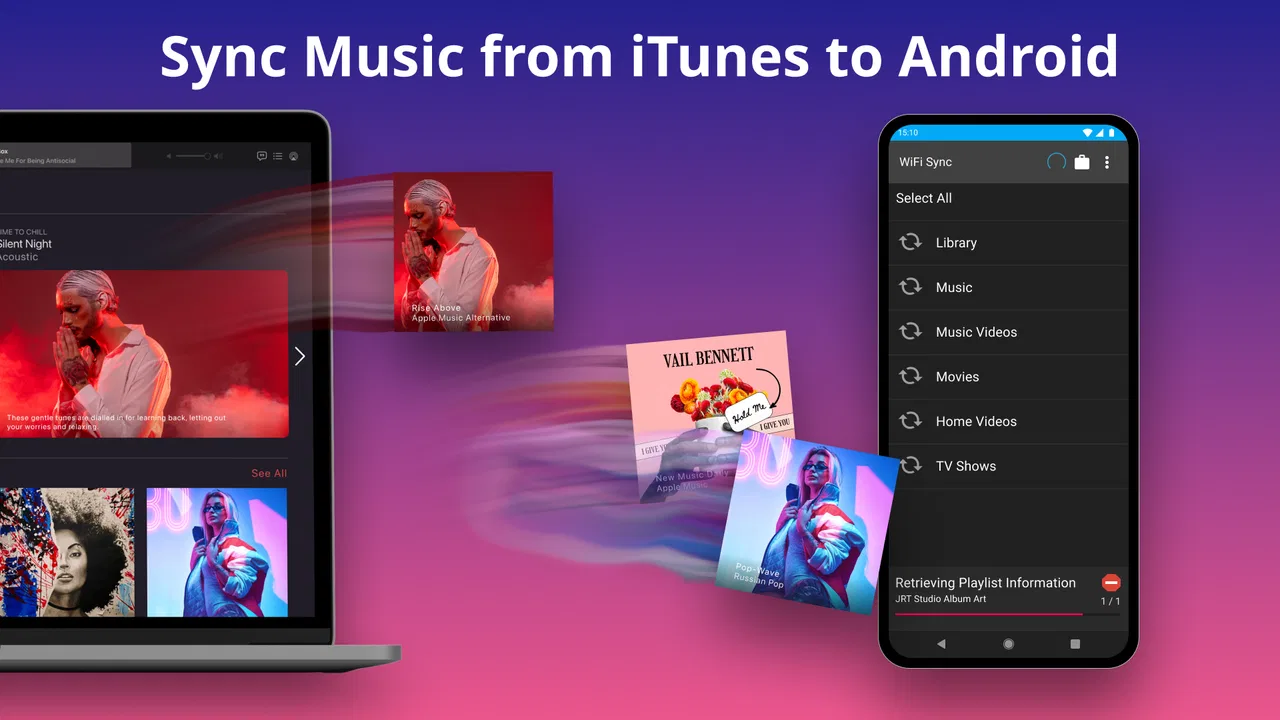
iSyncr: iTunes to Android is designed to transfer and synchronize music, playlists, podcasts, ratings, play counts, and other library information from iTunes to an Android device. After installation, it can help you access an existing iTunes collection without rebuilding your library manually in another music service. Its usefulness depends on your device, computer setup, and the version of iTunes or media library you are using.
02Do I need a computer or an iTunes installation to use iSyncr?
In most cases, iSyncr is intended to work with an iTunes library stored on a Windows PC or Mac, so you generally need access to that computer during the initial synchronization. Depending on the connection method, the Android phone may communicate through USB or a shared Wi-Fi network. Before downloading, make sure your computer is available, your music files are accessible, and both devices meet the app’s connection requirements.
03Can iSyncr transfer Apple Music songs or music purchased from iTunes?
iSyncr can synchronize compatible, locally stored media files from an iTunes library, but it cannot normally bypass digital rights management or download protected Apple Music subscription tracks for offline use outside Apple’s supported apps. DRM-free purchases and personal files are more likely to transfer successfully. Results may also vary depending on file format, storage permissions, and whether the original media remains available on your computer.
04Does iSyncr sync playlists, ratings, and play counts as well as music files?
One of iSyncr’s main advantages is that it can transfer more than individual songs. Compatible playlists and selected library information, such as ratings and play counts, may also be synchronized, helping your Android collection feel closer to your existing iTunes setup. However, not every iTunes feature is guaranteed to work identically on Android, and unsupported metadata, smart playlists, artwork, or unusual library structures may require manual adjustments.
05Is iSyncr free, and are there any limitations or extra requirements?
iSyncr may be available as a free download with limits, while some features, larger synchronization tasks, or companion tools may require an upgrade or separate purchase. You should review the current Google Play listing for pricing, supported Android versions, and any companion desktop software. Also check available storage, USB or Wi-Fi permissions, and backup your music library before performing a large synchronization, especially if duplicate files could be created.
Pros
- Syncs music
- playlists
- ratings
- and play counts with iTunes.
- Supports both Wi‑Fi syncing and USB transfer options.
- Works with large music libraries without requiring a cloud subscription.
- Can preserve playlist organization when moving from iTunes.
- Offers flexible syncing controls for selected artists
- albums
- or playlists.
Cons
- Requires a separate desktop companion app for full syncing functionality.
- Some advanced features may require an in-app purchase.
- Initial library scans can take a long time with extensive iTunes collections.
- Compatibility may vary with newer iTunes or macOS configurations.
- Podcast and media syncing may be less seamless than music syncing.

iSyncr: iTunes to Android
Gallery